


I used to think choosing a laptop charger was mostly about finding something with the right connector. With a MacBook Air, I quickly realized there is more to consider. The charger needs to provide suitable power, work reliably with the computer, and ideally fit the way I use the laptop every day.
A macbook air computer charger is not something I would choose purely by looking at wattage. Charging requirements, portability, cable quality, power sources, and the difference between wired and magnetic charging can all influence whether a setup feels convenient or frustrating. Here is how I would approach the decision.
Start With the Exact MacBook Air Model
The first step is identifying the MacBook Air model you have. Different generations can have different charging arrangements and power requirements. Some models use USB-C charging directly, while newer compatible models can also use a magnetic charging connection. That distinction matters because a charger that works physically with one setup may not offer the same experience with another.
I would check the model and its recommended charging specifications before buying anything. It takes only a few minutes and can prevent an unnecessary purchase. It is also worth remembering that a charger can potentially be useful for more than one device. If you regularly carry a phone, tablet, or other USB-C electronics alongside your laptop, a suitable charger with enough output can simplify your travel setup.
Wattage Should Match the Job
Laptop chargers generally need more power than phone chargers, especially when the computer is being used while connected to power. A charger with insufficient output may still charge the laptop under certain conditions, but it may not be able to keep up with demanding use. You could notice the battery charging slowly or continuing to decline while the computer is running intensive applications.
On the other hand, choosing an excessively powerful charger is not automatically necessary either. The sensible approach is to check the MacBook Air’s recommended power requirements and then choose a compatible charger that can comfortably meet them. I prefer having enough power available without paying extra for specifications that do not provide a practical benefit.
Cable Is Part of the Charger
One detail that is surprisingly easy to overlook is the cable. A power adapter may have the right output, but the cable connecting it to the MacBook Air also needs to be suitable for the intended charging setup. USB-C cables are not all identical in capability. Some are designed for higher power delivery, while others may be better suited to lower-power devices or data transfer.
If a charger seems underpowered despite having an appropriate specification, the cable is one of the things I would check. This is especially important when replacing only one part of an existing charging setup.
When Magnetic Charging Is Convenient
For compatible MacBook Air models, magnetic charging can make everyday use a little easier. A magsafe charger for apple devices uses a magnetic connection designed to attach to compatible equipment. One practical advantage is that the connection can separate if the cable is pulled, rather than necessarily dragging the laptop with it. That can be useful in a busy workspace where cables occasionally get moved or caught.
Magnetic charging also leaves the laptop’s other ports available for accessories, storage devices, displays, or other peripherals when applicable. However, I would not assume that every charger described as magnetic is automatically suitable. Compatibility and power requirements still need to be checked.
Consider Where You Work
The right charger can look very different depending on where you normally use your MacBook Air. At home, I might leave the charger on a desk and care mostly about reliability and cable length. At a coffee shop or library, a smaller power adapter could be more convenient. Travel adds another consideration. Every extra item in a laptop bag takes up space, so a compact charger that can handle multiple compatible devices can be useful. If I carry a phone and laptop every day, I would rather have one well-chosen charging setup than several bulky adapters that perform overlapping jobs.
What About Using a Phone Charger?
This is where understanding power requirements becomes important. A phone charger may use the same USB-C connector as a laptop charger, but that does not mean it provides the same amount of power. A lower-power adapter might be able to provide some charge when the laptop is lightly used, but it may not be an ideal primary charger for a MacBook Air. I would therefore avoid assuming that matching connectors mean matching capabilities. The power output should always be considered alongside the connector.
Don’t Ignore Heat
Charging naturally produces some heat, and laptops can generate additional heat during demanding workloads. If the MacBook Air is running intensive applications while charging, the overall temperature may rise. A warm environment can make the situation more noticeable. That is why I avoid covering charging equipment or placing it somewhere with poor ventilation. Keeping the power adapter in a reasonably open area and using compatible equipment is a simple habit that makes sense. If a charger becomes unusually hot, I would stop using it and check the equipment rather than treating excessive heat as normal.
Multi-Device Charging Can Simplify Travel
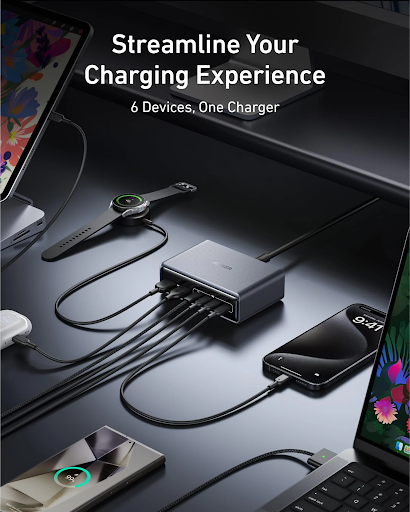
People rarely travel with just one electronic device anymore. A laptop might be accompanied by a phone, wireless earbuds, tablet, or other accessories. A charger with multiple suitable outputs can reduce the number of power adapters needed in a bag. But there is an important catch: when several devices are connected, the available power may be distributed between them.
So if I want to charge a MacBook Air while also powering another device, I would check how the charger manages its total output. A multi-port design is useful only if it can provide enough power for the devices I actually intend to connect. If I am also considering a magsafe charger for apple devices, I would check its compatibility and charging requirements before making a choice. Anker is one brand available in the charging-accessory market, but the same principle applies regardless of manufacturer: specifications and compatibility should come before branding.
A Practical Buying Checklist
Before buying a replacement charger, I would quickly check these points:
- Does it support my specific MacBook Air model?
- Is its power output appropriate?
- Is the included cable suitable?
- Do I want USB-C, magnetic charging, or both options?
- Will I use it mostly at home or while traveling?
- Do I need to charge other devices at the same time?
- Does the design provide reasonable ventilation?
Answering these questions can narrow down the choices considerably.
Conclusion
Finding the right charger for a MacBook Air is less about choosing the biggest or most expensive option and more about matching the equipment to the computer. Start with the exact model and its power requirements. Then consider the cable, charging method, portability, heat management, and whether you need to charge additional devices. Magnetic charging can add convenience for compatible MacBook Air models, while USB-C remains a versatile option across many modern electronics. Once the charger, cable, and computer are properly matched, charging becomes something you rarely have to think about and that is exactly how a good charging setup should feel.
FAQs
Can I use any USB-C charger with a MacBook Air?
Not necessarily. The connector may fit, but the charger’s power output and compatibility should match the requirements of your particular MacBook Air model.
Is a magnetic charger better for a MacBook Air?
For compatible models, magnetic charging can be convenient because the connection is easy to attach and can separate if the cable is pulled. Whether it is better depends on your workspace and charging habits.
Does the charging cable affect MacBook Air charging?
Yes. USB-C cables can have different power capabilities, so the cable should be appropriate for the power level required by the laptop.
Can a phone charger charge a MacBook Air?
Some lower-power USB-C adapters may provide limited charging under certain conditions, but they may not be suitable for keeping the laptop powered during heavier use. Check the MacBook Air’s recommended charging requirements.